Excel VBA vs Python: Which to Use for Automation
Excel VBA vs Python for automation, plus the two options people forget. Decided by where the script runs, who maintains it, and what you can install.
The VBA-versus-Python argument is usually had on the wrong axis. Python is the better language — that is not in dispute and it is not the deciding factor. What decides it is where the automation has to run, who has to maintain it, and whether you are allowed to install anything.
VBA is worse and is already on every Windows Excel install. That single fact wins more arguments than any language feature.
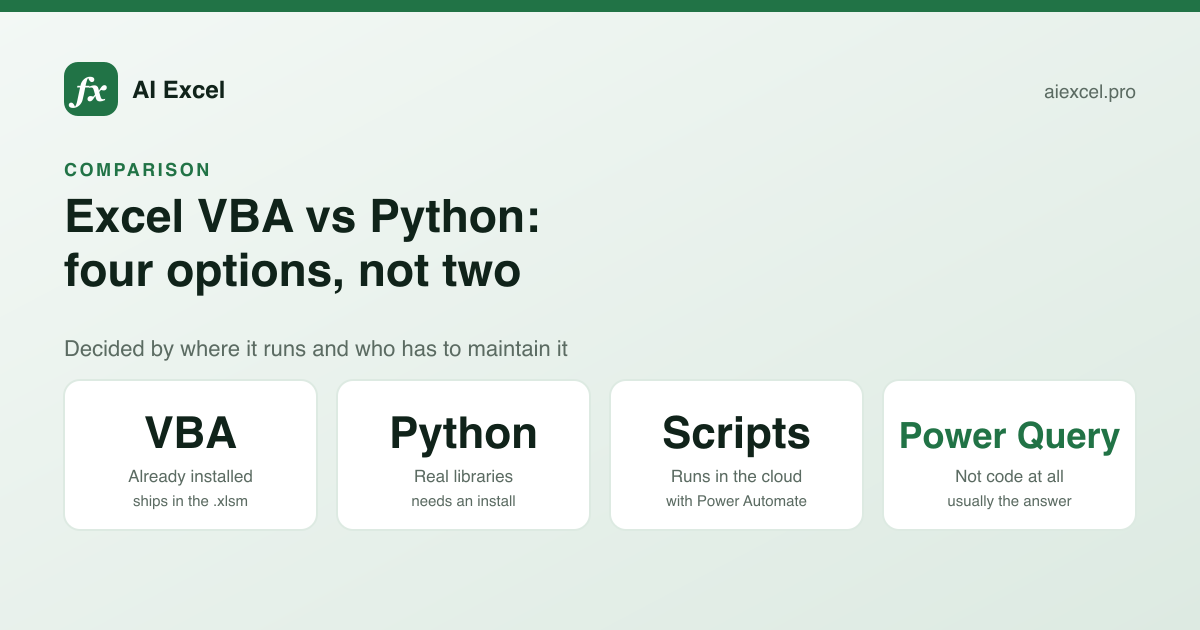
Four options, not two
"VBA or Python" leaves out the two that are often correct: Office Scripts, which is Microsoft's own successor and runs on the web, and Power Query, which handles the data-cleanup jobs people reach for automation to solve.
| VBA | Python (openpyxl etc.) | Office Scripts | Power Query | |
|---|---|---|---|---|
| Already installed | Yes | — | Yes | Yes |
| Runs in Excel for the web | — | — | Yes | Yes |
| Runs on Mac Excel | Mostly | Yes | Yes | Yes |
| Runs without Excel open | — | Yes | — | — |
| Drives Excel's own UI | Yes | Windows only, via COM | Limited | — |
| Reaches the internet / APIs | Awkward | Yes | Via Power Automate | Yes, built in |
| Sensible libraries | — | Yes | — | — |
| Version control friendly | — | Yes | Yes | — |
| A colleague can run it | Yes | Needs Python | Yes | Yes |
| Repeatable data cleanup | Manual | Yes | Manual | Yes |
The question that decides it
Does the automation have to run on a machine you do not control?
If yes, it is VBA or Office Scripts, because those are the only two that are already there. A Python script that needs an interpreter, a virtual environment and three packages is not something you can hand to a colleague in finance and expect to work — not because they are incapable, but because IT will not let them install it.
If no — it runs on your machine, or a server, or in CI — Python is better in every respect that matters. Real libraries, real testing, real version control, and it can read a workbook without Excel being installed at all.
What VBA is still good at
VBA drives Excel itself. It can manipulate the UI, respond to events, add ribbon buttons, and act on the exact selection the user has made. Python talking to Excel through COM can do some of this, on Windows, with more setup and more fragility.
It is also, crucially, distributable. The macro lives in the .xlsm file. You email the file, the recipient clicks a button, it works. No environment, no dependencies, no README.
Python
1. Install Python 3.12
2. pip install openpyxl pandas
3. Run: python clean_report.py input.xlsx

// Steps 1 and 2 need admin rights.
Fine for you. Often impossible on a managed machine, and it is a support burden forever.
VBA
1. Open Report.xlsm
2. Click "Clean"

// Enable macros once when prompted.
Worse language, but the distribution problem is already solved. This is why VBA persists.
What Python is clearly better at
Anything involving a network call, a real data structure, a date library, or more than about two hundred lines. VBA has no package manager, no modern collections, error handling built around On Error GoTo, and a testing story that amounts to pressing F5 and watching.
It is also better at scale. openpyxl and pandas will process a hundred workbooks in a folder without Excel ever opening, which is both faster and far more reliable than automating the application.
And it is diffable. A VBA module lives inside a binary workbook, so "what changed in this macro" is not a question git can answer. A .py file in a repo is reviewable.
Office Scripts, the one people forget
Office Scripts is TypeScript, runs in Excel for the web as well as desktop, and is the piece that connects to Power Automate for scheduling. If your organisation is on Microsoft 365 and you want something that runs on a schedule without a machine being switched on, this is the answer rather than either of the obvious two.
Its object model is narrower than VBA's, and it cannot reach outside the workbook on its own. For "reformat this report every Monday morning", that is not a limitation.
Power Query, which is usually the real answer
A large share of the jobs people want to automate are: import a file, split some columns, remove some rows, unpivot, and do the same next month. That is exactly Power Query, it is built into Excel, it records the steps, and it needs no code at all.
Writing that as a macro is a mistake people make regularly, and the macro is worse: harder to change, harder to audit, and more likely to break silently when the input format shifts. Check whether your automation is really a data-transformation job before writing any code.
Choosing
What does the automation need to do?
Colleagues run it on their machines
VBA
Ships inside the .xlsm. No install, no environment, no support burden.
Same import and cleanup monthly
Power Query
No code, records the steps, and refreshes in one click.
On a schedule, nobody present
Office Scripts + Power Automate
The only combination that runs in the cloud without a machine being on.
Hundreds of files, or an API call
Python
Real libraries, and it does not need Excel installed to read a workbook.
Reacting to a cell edit
VBA
Worksheet_Change events are VBA's home ground. Nothing else does this as directly.
It needs tests and code review
Python
VBA lives inside a binary file. Git cannot review it and you cannot test it properly.
If you are writing VBA
- 1
Option Explicit at the top of every module
Without it, a misspelled variable is silently a new empty Variant. This turns a typo into a wrong result rather than an error you can see.
- 2
Qualify every object reference
ThisWorkbook.Worksheets("Orders").Range(...), never bare Range(...). Unqualified references act on whatever sheet is active — which works while you test and fails when a colleague runs it from another tab.
- 3
Find the last row, never hard-code it
Cells(Rows.Count, 1).End(xlUp).Row. A macro written against 500 rows silently processes less than it should the month row 501 arrives.
- 4
Test on a copy, every time
VBA operations do not enter the undo stack. A delete loop that targets the wrong column has deleted it, and Ctrl+Z will not help.
- 5
Restore state in the error handler
If you set Application.ScreenUpdating to False, an early exit leaves Excel looking frozen. Reset it in the handler as well as the happy path.
- 6
Save as .xlsm
A .xlsx discards macros on save. Excel warns once, and the warning is easy to click past.
The VBA generator on this site applies the first three of those by default, and will write Apps Script instead if you switch the dialect.
The pragmatic summary
Learn enough VBA to automate Excel for other people, because that is where it has no real competitor. Use Python for anything that is really a data pipeline wearing a spreadsheet costume. Reach for Power Query before either, because it solves more of these problems than people expect. And if the automation needs to run when nobody is logged in, that is Office Scripts and Power Automate, not a debate between the other two.